That’s a Lot of Buzzwords
You are completely right, but enough of those will hopefully get me onto hackernews or something :). In any case, what is this actually about?
If you’ve been subjected to building tooling for CobaltStrike you have doubtlessly had to trudge through agscript and sleep documentation. It’s rather sparse and there is not a lot of resources for doing anything outside of the artifact kit or doing simple client automation. If you’ve dug a little bit deeper, you may have also seen an attempt to smooth the process over by using python. This is a useful tool, but I wanted something in the middle of these two options.
Look at the source code here:
The simple solution I came up with is a very basic TCP RPC server written in sleep that can evaluate and execute aggressorscript at runtime, allowing you to build scripts in other languages that can generate and send commands to the teamserver instead of needing to write all of that logic in the script itself. I’ll provide a picture below with an example to illustrate the usecase:
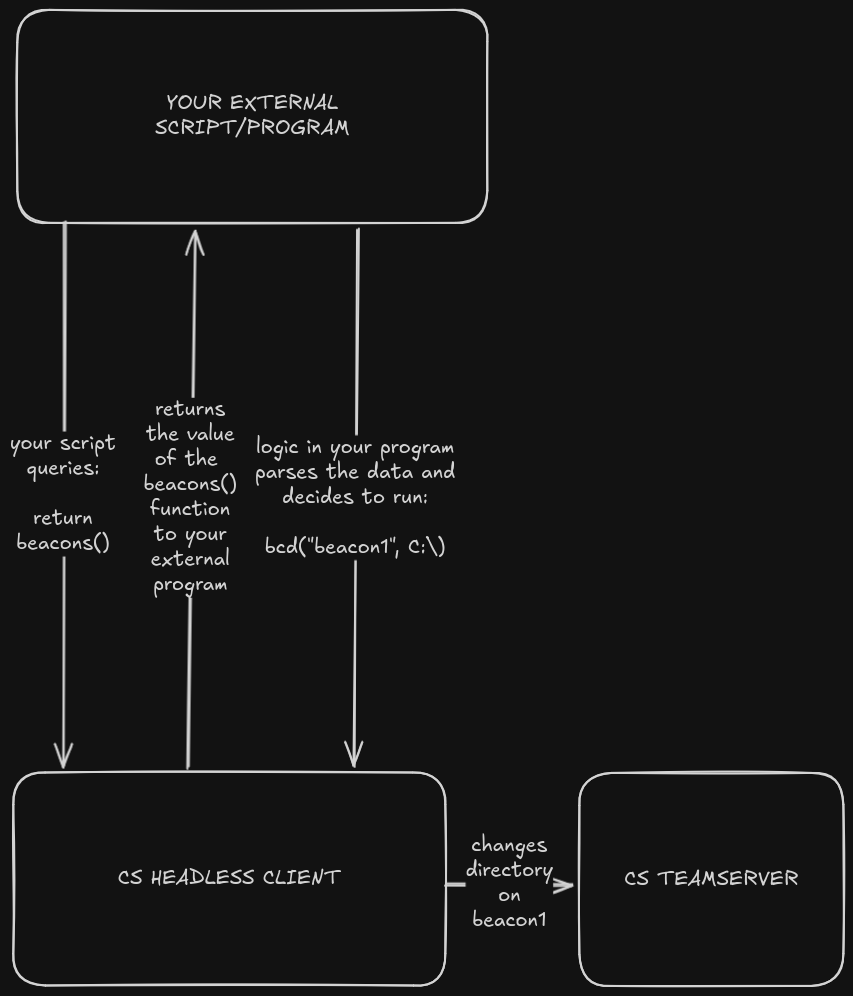
While this is obviously a very simplistic example, hopefully it shows the utility of a tool like this. Instead of needing to write out the logic for what beacon to change the directory on, you can offload the flow control and logic to any external programming language you would like. So, for example, if you were writing your own frontend to handle large scale automation, you no longer need to write the whole thing in aggressorscript or rely on hardcoded scripts that are invoked through the command line.
Other Use Cases
Here are some more real-world usecases that inspired this:
- Writing a third party GUI to manage external C2 operations without needing to use multiple applications
- Automating setup on the teamserver host, such as implementing dynamic firewall rules
- Integrating CobaltStrike into custom payload generation pipelines without needing to use the GUI
- Integrating CobaltStrike actions with external tooling where invoking individual aggressorscripts would be tedious
- Registering an external program to the CobaltStrike event loop, to notify it whenever a state change is made to the teamserver. This could trigger a slack or discord bot whenever a callback happens.
Disclaimer
While I think this is cool and useful, it’s also likely not secure or stable in its default implementation. Feel free to use any code I discuss below or have written, but you should expect to add in your own safety features and potentially fix bugs, as this is certainly very poorly tested.
How It Works
Overview
The implementation is extremely simplistic, and I’ll provide an overview here before getting into more details.
In essence, this tool, “agscript_middleware” is a very simple multithreaded sleep tcp server built around a REPL. Since the context it’s running in allows it to utilize the built in CobaltStrike agscript environment, you can pass it valid agscript strings and it will execute them or return the relevant data. The process works like this:
- You run the middleware (or another script which has implemented it, more on this later) using the
agscriptbinary that ships with CobaltStrike. This loads the middleware as a headless client. - Once being loaded, the middleware creates a thread which binds to a socket and begins listening for connections.
- When a connection is made to that socket, another thread is forked for each connection. We’ll refer to this as the client from now on.
- The client sends a string over TCP with a format very similar to CS External C2: the size of the payload in an 8 character hexadecimal string, followed by the desired command.
- The middleware receives the payload and executes the client’s command.
- If the client’s command was preceded with a
returnkeyword, e.g.return beacons(), the return value is converted to a string and sent back to the client in the same format as the initial command. - The client’s thread stays open and the middleware awaits another command.
That is the core loop, and if you only want to run some simplistic commands, it works fantastically for this. There is some additional functionality, though, that doesn’t fit the above loop and that I’ll outline now.
Injectable Runtime
I’m unsure if this is the proper terminology for this, but the library is written in such a way where it can be included into another agscript library using the include(script_resource()) function. This allows you to write a library around the middleware instead of needing to jam it into an existing script. Here is an example:
...
include(script_resource("middleware.cna"));

sub foo {
	action("bar");
}
...
Including the middleware into this script now allows any client which connects to call the foo() function, meaning that if you have existing aggressorscript functionality which you would like to call remotely, you can do that very simply. In this sense it’s sort of like a reverse library.
Middleware is also not blocking, meaning any code called before or after should not interfere with the running of the primary script. The include() function also respects flow-control, meaning this:
on ready {
	action("on main script ready");
}

action("before loading")


include(script_resource("middleware.cna"));


action("not blocking");
Will not block the execution of any of the action() functions, and will occur after on main script ready and before loading, but before not blocking.
Configuration
Since aggressorscript supports global variables, the configuration information for the middleware can be passed from the host script without needing to modify it directly:
global('$MWHOST, $MWPORT, $MWNAME, %MWSHARED');
#$MWHOST = "127.0.0.1" # This is commented out to show that there are defaults.
$MWPORT = 50052; # Set the port to something different than default
$MWNAME = "Basic Example"; # name the middleware
#%MWSHARED = We'll get to this later

include(script_resource("middleware.cna"));
These are optional variables with defaults, but allow you to change the socket that the middleware binds to. You can also name them if you intend to run multiple, for organization’s sake.
Data Sharing & Multithreading
If you are writing a sufficiently advanced program, you may wish to manage program state. This can be done using the MWSHARED hash table, which allows you to pass in persistent data to the middleware thread that can be accessed by any connecting client and the host script. We’ll use an example below of registering a client to a built in CobaltStrike heartbeat:
global('$MWHOST, $MWPORT, $MWNAME, %MWSHARED');
#$MWHOST = "127.0.0.1" # This is commented out to show that there are defaults.
$MWPORT = 50052; # Set the port to something different than default
$MWNAME = "Example Middleware"; # name the middleware
%MWSHARED = %( # Define a shared object to pass back and forth from the middleware context and your own library's context.
  socket_array => @(),
  sem => semaphore(1),
);

# Again ensure that the middleware script is included after global definitions
include(script_resource("middleware.cna"));
You begin by setting the configuration options and defining the MWSHARED variable. You can include any data in this, in this instance socket_array will be used as a dynamic array that contains every socket we want to register to the heartbeat. The only stipulation is that, to work across threads, MWSHARED MUST include a semaphore to manage data access.
Now, in our host program, we can add a function that the client can call to add itself to the socket array:
sub heartbeat_register {
  acquire(%MWSHARED['sem']);
  push(%MWSHARED['socket_array'], $1);
  release(%MWSHARED['sem']);
  action("Registered " . $1 . " to the heartbeat test")
}
This function acquires an exclusive lock on the shared memory, pushes the socket passed as an argument to the list, releases the lock and prints to the event log.
If the client sends the command: heartbeat_register($socket), it will now be added to socket_array globally.
Now, if we write the following code to bind to the heartbeat callback:
on heartbeat_5s {
  acquire(%MWSHARED['sem']);
  action(%MWSHARED);

    for ($i = 0; $i < size(%MWSHARED['socket_array']); $i++) {
        send_message(%MWSHARED['socket_array'][$i], "HEARTBEAT!");
    }
    release(%MWSHARED['sem']);
}
Every five seconds, every registered client will receive a message stating “HEARTBEAT”.
Message Sending
The least impressive for last, any program can use the send_message($socket) function in order to send arbitrary data to a client, as seen above.
References
Thanks!
https://sleep.dashnine.org/manual/ https://lulz.io/posts/2020/please-don-t-pass-to-exec/